

Annual reporting is three weeks away, and your spreadsheet won't reconcile. One hundred forty attendees downloaded certificates from last spring's live symposium, yet far fewer finished the required post-session evaluation. Two faculty disclosure forms are sitting unreviewed in an old email thread, and a corrected credit batch you uploaded to a certifying board last month accidentally doubled hours for a dozen physicians.
Most guides treat credit as a single math problem. In day-to-day operations, the math is rarely what fails. Errors cluster at the handoffs between stages, when a registration file doesn't link to an attendance log, an evaluation gate doesn't block a certificate, or a corrected upload overwrites nothing and inserts duplicates instead.
The volume running through these handoffs is massive. In 2025, accredited providers in the ACCME System generated 57.5 million learner interactions, according to the ACCME 2025 Data Report news release. No single software purchase removes the need for clear process, so let's walk through every handoff where records break and the controls that keep them clean.
Table of Contents
- Continuing Education Administration Stages and Records
- How to Collect Disclosures Before an Activity Starts
- How Credit Is Calculated for Each Activity Type
- Learner Records That Boards and Accreditors Require
- Releasing Credit and Certificates in the Right Order
- Credit and Records Errors and How to Fix Them
- Choosing Supporting Technology for Each Stage
- Confirm Your Records Setup Before the Next Activity
Continuing Education Administration Stages and Records
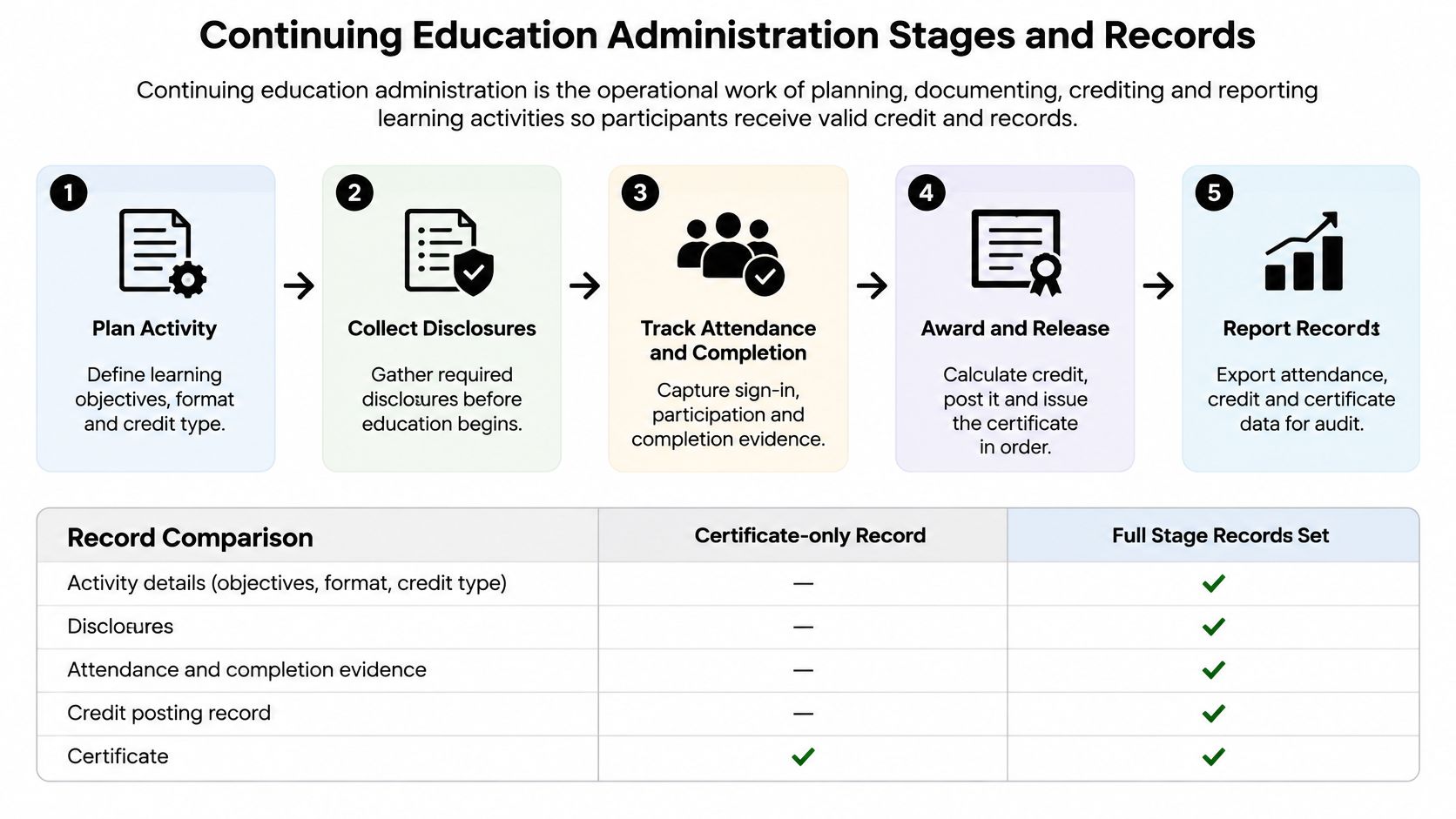
Continuing education administration is the operational work of planning, documenting, crediting, and reporting learning activities so participants receive valid credit and sponsors can show what happened. Much adult learning sits outside formal degree programs, so education teams carry the operational load across workshops, courses, and employer training. Across OECD countries covered by the OECD Survey of Adult Skills, 8% of adults participated in formal learning in 2023, while 37% participated in non-formal learning.
A single quarter might include a two-day live program, a four-week enduring online module, and journal-based activities. Each format has its own completion rules, yet all three depend on the same administrative chain. The chain only works when each stage leaves a record the next stage can use.
The Seven Stages in Operational Order
Every stage creates a record that the next stage depends on. Skip a field at setup, and the gap stays quiet until reporting season exposes it.
- Program setup. You lock in the activity type, instructional schedule, credit rules, and designated maximum before registration opens.
- Faculty preparation. You collect financial disclosures, track review and mitigation, and gather presentation files ahead of the event.
- Registration and attendance. You capture verified learner identities alongside actual session sign-ins and scheduled break times.
- Evaluation completion. You verify that each participant finished mandatory feedback or assessments before credit is released.
- Credit calculation. You apply the activity's specific award formula, tie it to the activity version, and cap claims at the approved maximum.
- Certificate issue. You release certificates only for eligible records and capture learner consent for any external reporting.
- Reporting and reconciliation. You transmit individual or aggregate data, clear rejected records, and confirm every count matches before closing the activity.
Practitioners can also browse professional growth articles for broader perspectives on continuing development expectations. Keep that material separate from activity records, though. Professional growth reading does not replace the credit rules, attendance proof, evaluation status, and reporting data tied to a specific activity.
The specific rules used throughout this guide come from medical continuing education (ACCME and AMA) because their published standards offer a clear operational blueprint. Other professions, from accounting to teaching to legal education, set their own hour formulas and documentation rules, so always verify requirements with your issuing body.
Where Missing Stage Records Break the Chain
| Stage | What Gets Recorded | Failure If Missing |
|---|---|---|
| Program setup | Activity type, credit rules, designated maximum | Credit calculated with the wrong formula |
| Faculty preparation | Disclosures, presentation files, task status | Content published before conflicts are reviewed |
| Registration and attendance | Learner identity, sessions attended, break times | Credit claimed for noneducational time |
| Evaluation completion | Required evaluation status and completion date | Credit issued before evaluation is done |
| Credit calculation | Credit type, amount, activity version | Duplicate or incorrect credit |
| Certificate issue | Certificate status, learner consent | Certificates unavailable for audit |
| Reporting and reconciliation | Transmitted, rejected, and open records | Gaps found only at annual reporting |
Read the third column as a handoff map. Program setup feeds credit calculation, attendance feeds eligibility, evaluations gate release, and reporting depends on every earlier count staying stable. A missing field is rarely isolated; it travels forward until someone finds it during an audit, a board upload, or a reconciliation.
That is why I would configure the workflow around gates, not reminders alone. If evaluation status is incomplete, certificate access should stop. If a corrected credit batch is uploaded, the system should update the original record rather than insert a second one. Clear process still matters, because no tool can decide which rule applies when a program changes its activity type or credit maximum after launch.
How to Collect Disclosures Before an Activity Starts
A signed disclosure form can still leave an activity unready to launch. Someone must review the relationships, document any required mitigation, and prepare the learner-facing disclosure before education begins. Under the ACCME Accreditation Requirements, providers must collect financial relationships with ineligible companies covering the prior 24 months from planners, faculty, and anyone else controlling educational content. Work backward from launch to schedule those handoffs.
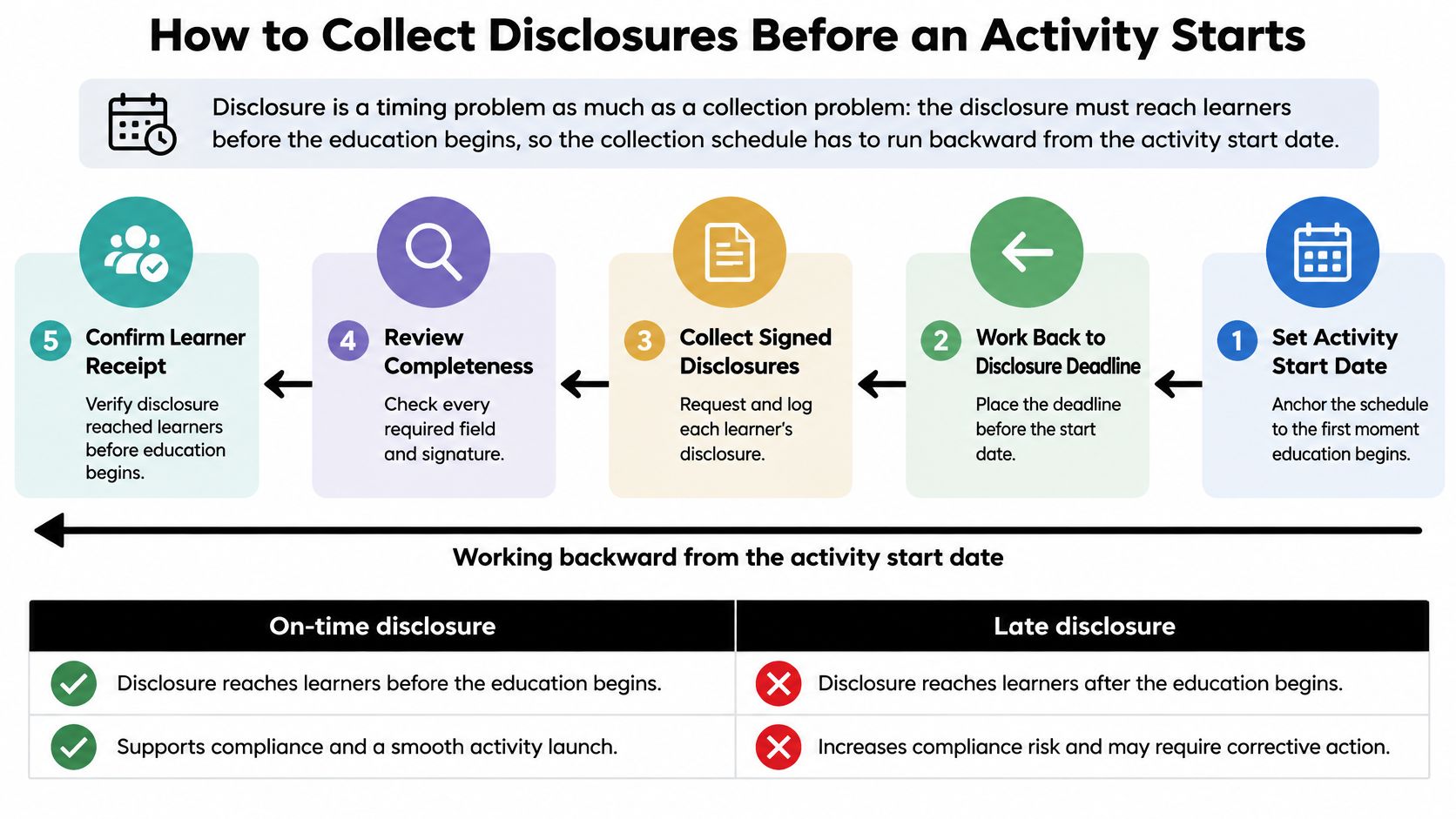
The workflow below covers six steps for planner, faculty, and other content-controller disclosures, including the separate commercial-support record.
Six Steps for Running Backward From Launch Day
- Map everyone who controls content. Link planners, speakers, moderators, and reviewers to the specific activity ID before invitations go out. Include committee chairs and enduring-module peer reviewers where they control content. A speaker roster alone does not establish who needs review.
- Send dated forms before confirming speakers. Use a standardized financial disclosure form covering the required reporting period while invitations remain conditional. Collecting forms before public announcements preserves room to address relationships that cannot be mitigated without disrupting an announced program.
- Review and document mitigation. Assign a reviewer to evaluate reported relationships, determine their relevance to the educational content, and record any mitigation required and completed. Keep review status distinct from submission status. A signed PDF proves collection, not that someone assessed it.
- Track overdue forms in a shared task list. Connect disclosure deadlines with presentation-file deadlines, assign responsibility for follow-up, and escalate outstanding requirements before files are due. Shared tracking keeps the next action visible when the coordinator handling reminders is unavailable.
- Publish disclosures prior to the first instructional minute. Put the learner-facing summary in the portal, pre-session handout, or opening screen before education starts. Check that learners can view it. A slide buried in a presentation is a weak handoff if the speaker skips it or displays it after instruction begins.
- Maintain a full commercial support ledger. Record supporting companies, the nature of in-kind support, and how support funds were used. Retain signed letters of agreement and final expense logs with the activity record. Keep commercial-support disclosures alongside the preparation workflow without treating them as substitutes for individual disclosures.
One-week pre-event audit: Check every content controller against the activity roster. Confirm a dated, reviewed form, documented mitigation where required, and a learner-facing disclosure ready before instruction. Resolve gaps before marking the activity ready to launch.
How Credit Is Calculated for Each Activity Type
One time-based formula won't survive a multi-format continuing education calendar. A coordinator who applies a straight "one credit per hour attended" rule across live sessions, online modules, and journal quizzes will miscalculate credit before the quarter ends.
Comparing Credit Mechanics Across Formats
According to the AMA Physician's Recognition Award FAQ, AMA's credit system assigns distinct calculation rules and award triggers depending on the activity format.
| Activity Type | Credit Rule | Award Condition |
|---|---|---|
| Live activity (AMA PRA Category 1 Credit) | 1 credit per 60 minutes of educational time | Claimed in 0.25-credit units up to the designated maximum |
| Enduring material | 1 credit per hour | Awarded at the designated amount after successful completion |
| Journal-based CME | 1 credit per article | Per article completed |
| Test-item writing | 10 credits per activity | Per activity |
| Manuscript review | 3 credits per accepted manuscript review | Per accepted review |
| Performance Improvement CME | 20 credits for a completed activity | 5 credits per stage if only one or two stages are completed |
Look at how differently those completion triggers behave. For an enduring module, the learner doesn't claim partial minutes; they earn the full designated amount once they pass the completion requirement. For Performance Improvement CME, stopping after stage two yields 10 credits (five credits per completed stage), whereas finishing all three stages earns the full 20 credits. Meanwhile, manuscript review awards 3 credits only after the review is accepted, not merely submitted.
A Worked Example of Quarter-Hour Rounding
Live sessions create the highest risk for manual math errors because instructional time and clock time rarely match. Suppose your two-day live program includes a 90-minute afternoon workshop with a scheduled 15-minute coffee break in the middle.
- Subtract the 15-minute break from the 90-minute room block to get 75 minutes of actual educational time.
- Convert 75 minutes at one credit per 60 minutes to establish a designated maximum of 1.25 credits.
- Now consider a physician who checks in on time but gets paged out after 50 minutes of instruction (prior to the break). Rounded to the nearest 15-minute increment, 50 minutes rounds to 45 minutes, so that participant claims 0.75 credit, not a full hour and not the 1.25 maximum.
Each participant claims only their own verified participation time, strictly capped at the activity's designated maximum. For teams managing multiple credentialing bodies alongside medical credit, reviewing how continuing education credit hours convert across contact hours, CEUs, and specialized credits helps prevent formula mix-ups during setup.
Required Activity Metadata Before Launch
To keep calculations consistent across live events, enduring modules, and journal articles, every activity record in your system needs four locked fields before registration opens:
- Activity type: Selects the right rule engine (live, enduring, journal-based, test-item writing, manuscript review, or Performance Improvement).
- Completion rule: Defines whether credit is earned through time-based attendance, a passing quiz score, stage completion, or an accepted review.
- Designated maximum: Sets the hard ceiling that no learner claim can exceed.
- Award logic: Specifies whether the system accepts partial quarter-hour claims or grants a fixed credit amount upon completion.
Learner Records That Boards and Accreditors Require
An aggregate attendance count tells an accreditor how many seats you filled. A static PDF certificate proves a document was generated. Neither one gives a certifying board a verifiable record of who completed what, when they finished it, and whether they authorized you to share their data.
For medical activities offering Maintenance of Certification or Continuing Certification (MOC/CC) credit, the ACCME MOC/CC reporting guidance requires providers to capture and transmit an individual learner-completion record rather than relying only on aggregate attendance. Aggregate totals still work for general activity reporting, yet individual board credit demands a single joined learner-activity record linking registration, attendance, evaluation status, credit calculation, consent, and certificate status.
Required Fields and Where Each Originates
Reconstructing missing learner identifiers after an event closes creates weeks of email chasing. Every required field should be captured at the exact stage where it naturally enters your workflow.
| Required Record Field | Stage Where It Originates | Why Boards and Audits Require It |
|---|---|---|
| Certifying-board ID | Registration | Matches the completion to the exact physician profile at the board |
| First and last name | Registration | Cross-checks learner identity alongside the board ID |
| Partial birth date | Registration | Prevents mismatches between learners who share the same name |
| Activity-completion date | Attendance and evaluation | Establishes the exact reporting period and MOC cycle for the credit |
| Credit type | Program setup and credit calculation | Must match the approved activity type and board credit category |
| Credit amount | Credit calculation | Records verified earned credit within the designated maximum |
| Learner sharing consent | Registration or certificate issue | Proves the learner granted permission before sharing data with ACCME and boards |
This strict tie between individual identity and credential eligibility isn't unique to healthcare. Regulated fields across the board rely on matching verified person-level records against issuing-body rules, similar to how aviation instructors verify documentation against student pilot certificate eligibility rules from CFII before a candidate can advance. Keeping your recordkeeping anchored to one stable learner-activity key instead of disconnected spreadsheets stops those identity mismatches before they start.
Can you pull one learner's entire history, from initial registration through evaluation completion to board transmission status, inside a single view? If the answer requires three VLOOKUP formulas, your record structure isn't audit-ready.
At Planstone, we configure our platform to each program's review criteria, faculty requirements, and credit rules, from the forms contributors complete to the reports staff rely on. When the form fields match the downstream reporting schema from day one, staff stop hunting for missing birth dates or board IDs after the event closes.
Releasing Credit and Certificates in the Right Order
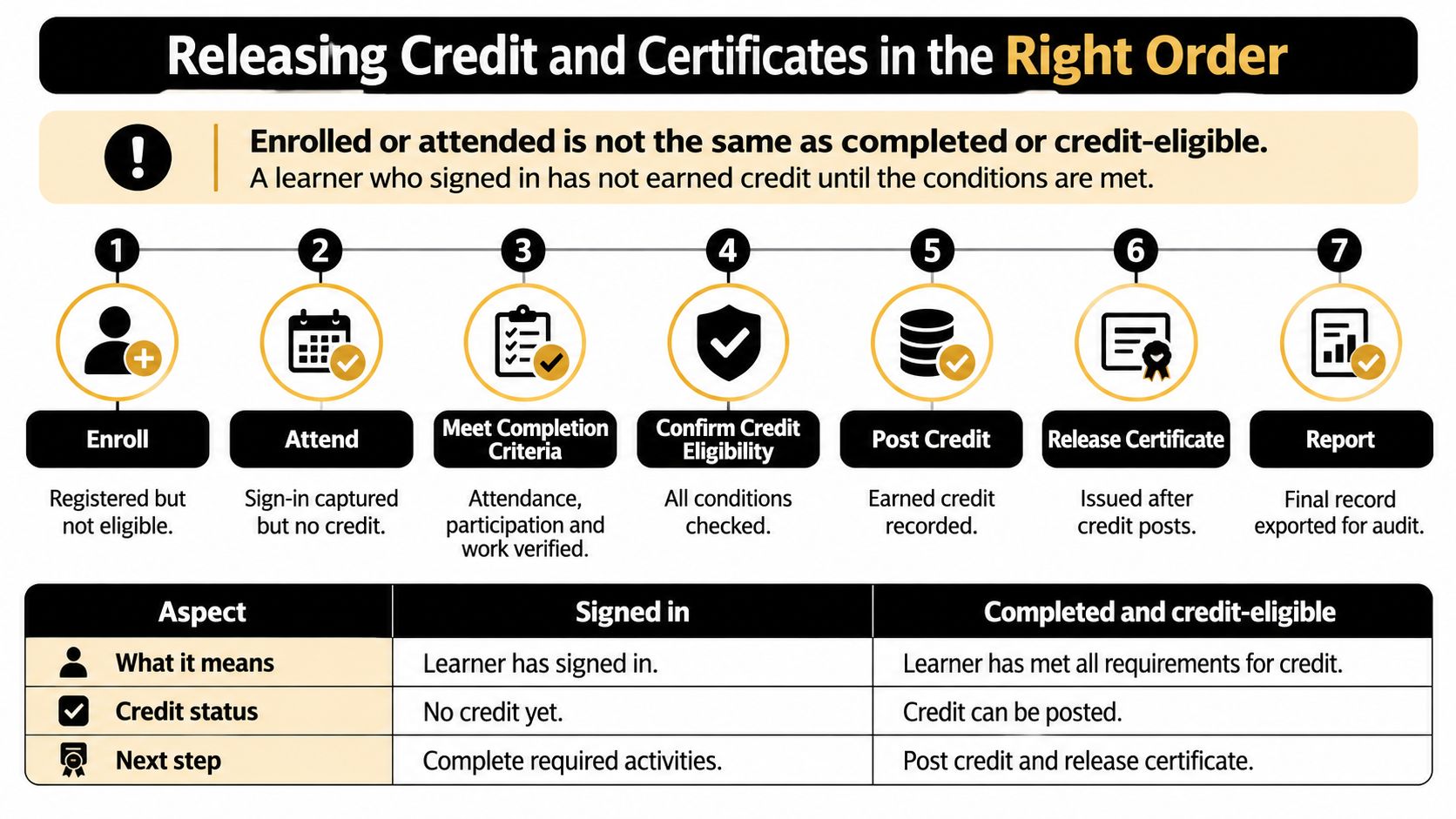
Enrollment does not prove attendance, and attendance does not prove credit eligibility. A learner who scanned a badge at 8:00 a.m. has earned no quarter-hour of credit until participation and evaluation conditions are verified.
I recommend treating credit issuance as a rule-based state transition. General activity data can sit in the course record, while learner completion data must move through a defined sequence before credit or certificates are released. That separation matters because errors cluster at handoffs: credit released before evaluations are complete, certificates generated before credit posts, or resubmissions that duplicate credit instead of updating the original record.
The Seven-Step Release Sequence
Verify participation against time rules. Pull session sign-in logs, virtual watch-time exports, or module completion timestamps. Strip out noneducational breaks before marking attendance confirmed.
Gate credit behind required evaluations. Check that mandatory post-session evaluations, reflective statements, or quiz thresholds show a completed timestamp. Block certificate downloads while an evaluation sits in draft status. This single gate prevents most premature releases.
Calculate credit using locked activity rules. Run the activity type's formula against verified participation and enforce the designated maximum automatically. Credit tracking should follow the program's credit types and requirements, not staff judgment exercised ad hoc at closeout.
Issue certificates exclusively from eligible records. Generate the PDF or transcript entry only after credit posts. Every certificate in circulation should match an underlying credit record, with the same learner, activity, credit type, and completion status.
Write to an auditable event trail. Log participation verification, evaluation completion, calculated credit, learner consent, certificate generation, and transmission status alongside the original activity version and completion date used in the calculation. If a course syllabus changes next quarter, historical records stay intact.
Run pre-submission schema checks. Validate every outgoing batch for blank board IDs, invalid partial birth dates, mismatched credit types, or out-of-range credit values before uploading. Portals reject malformed files, so catching schema errors internally saves rework and keeps the closeout queue moving.
Transmit within the reporting window. Push validated individual completions on a rolling closeout schedule rather than waiting for year-end. ACCME MOC/CC reporting guidance says completions should be submitted within 30 days of the learner finishing the activity, so a weekly queue keeps the process inside that reporting expectation. Process data reporting questions before they become blocked files or incomplete learner histories.
Idempotency and the Closeout Reconciliation Check
Corrections happen. A learner submits a missing board ID two weeks later, or a session credit adjustment requires an updated file. Every learner-activity record must be idempotent, meaning resubmitting a corrected batch updates the existing record rather than inserting a second credit entry. Without that control, a learner can appear to earn duplicate credit, and staff then have to decide which record is authoritative.
Before marking any activity closed, run one reconciliation report comparing four counts:
- Eligible completions (learners who met every attendance and evaluation condition)
- Certificates issued (documents generated from those eligible records)
- Records transmitted (completions accepted by the reporting portal)
- Rejected records and unresolved exceptions (items blocked by validation rules or missing consent)
An activity is not closed until eligible completions equal certificates issued, transmitted records plus non-consenting learners account for every eligible completion, and unresolved exceptions sit at zero. That last condition is the operational discipline behind sound continuing education administration: credit, certificates, and reporting stay aligned because each release depends on the verified state before it.
Credit and Records Errors and How to Fix Them
The most expensive mistake in continuing education administration is releasing credit before a required evaluation is complete. Once an unverified completion transmits to a certifying board, you can't pull it back without formal retraction notices, learner confusion, and an awkward audit trail.
Most recurring record failures trace directly back to broken handoffs or unenforced validation checks. For live programs offering AMA PRA Category 1 Credit, the AMA Physician's Recognition Award booklet sets strict operational guardrails: one credit per 60 minutes of educational time excluding breaks, claimed in 15-minute (0.25-credit) increments rounded to the nearest quarter hour, based on individual participation up to the designated maximum. When a workflow skips those checks, errors show up fast.
Common Record Failures and Corrective Actions
| Symptom | Likely Cause | Fix |
|---|---|---|
| Credit issued before evaluation finished | Certificate download link isn't gated by evaluation completion status | Block certificate release until the evaluation timestamp posts; audit existing certificates before board transmission |
| Live credit totals run higher than expected | Scheduled breaks or lunch periods were included in educational minutes | Separate instructional blocks from noneducational breaks in activity setup and recalculate before closing the batch |
| Participant claimed more than the approved maximum | Self-claim form lacks an upper-bound cap tied to the activity setup | Enforce a hard maximum ceiling equal to the designated credit amount and flag over-claims automatically |
| Duplicate credit appears after a correction | Re-uploaded file lacked a stable learner-activity key | Implement idempotent record keys so corrected batches overwrite prior rows rather than appending new ones |
| Certifying board rejects a batch row | Missing board ID, malformed partial birth date, or blank credit value | Run pre-submission schema validation and route incomplete rows into an exception queue prior to upload |
| Certificate is missing a required accreditation statement | Template wasn't linked to the current activity version or credit type | Correct the template mapping and reissue certificates from the same underlying eligible credit record |
| Wrong credit type reported for an activity | Activity type was misclassified during initial program setup | Update the activity metadata, re-run the credit calculation rule, and submit a corrected replacement record |
Triage by Urgency and Monitor Exceptions Weekly
Not every error carries the same blast radius. A formatting glitch on a PDF certificate can usually be reissued cleanly from the exact same eligible credit record without touching external reporting. By contrast, a wrong credit amount, invalid credit type, or missing board identifier affects what an external licensing authority receives and must be resolved before the submission window closes.
Stop bad records before transmission, never after. Catching a missing board ID in an internal validation check takes two minutes; unwinding a bad submission across an accreditor and a state board takes weeks.
Learners themselves often double-check whether their completions registered with the right agency, much like drivers using the BDISchool Florida completion check guide to confirm a traffic school certificate posted cleanly. Build a habit of reviewing open exceptions every Friday during active reporting cycles. Clearing five missing identifiers a week prevents a pileup of two hundred broken records right before your annual accreditation filing.
Choosing Supporting Technology for Each Stage
Software won't fix an undefined process, yet manual tools eventually collapse under multi-format volume. Before evaluating any platform, score it against six essential operational criteria.
Six Technical Criteria for Clean Records
- Activity-level rule configuration. Each activity must store its own activity type, completion rule, designated maximum, and award logic independently. Hard-coded global formulas break the moment you add enduring modules or journal activities alongside live conferences.
- A stable learner-activity key. Every record needs one persistent identifier tying a specific learner to a specific activity version, so batch corrections update the right row cleanly without creating duplicates.
- An auditable event trail. Look for automatic timestamp logging across attendance verification, evaluation gating, calculated credit, learner consent, certificate generation, and board transmission.
- Pre-submission validation with an owned exception queue. The system should catch blank identifiers, out-of-range credits, and missing consent before export, then place those rows into a visible queue assigned to a staff member.
- Consent capture and compliant data handling. Beyond recording board-sharing permission, your platform needs strict access controls and clear retention policies. As the ACCME Guidance on Artificial Intelligence in Accredited CE notes, providers must de-identify evaluation and learner-performance data where required, maintain governance and access protocols, and store learner data inside secure, access-controlled databases.
- Transparent batch import and export. Any batch workflow must return row-level validation errors in plain language rather than failing with a generic error code.
Spreadsheets Versus a Configured Platform
| Dimension | Spreadsheets and Shared Docs | Configured CE Platform or LMS |
|---|---|---|
| Best fit | Low volume, such as one annual course with few speakers and no board reporting | Multiple activity types, recurring events, or individual board submissions |
| Key advantages | Zero licensing cost, fast initial setup, full manual flexibility | Automated evaluation gating, rule enforcement, joined learner records, audit trails |
| Primary disadvantages | Manual joins across files, no audit trail, high risk of duplicate credit after edits | Initial configuration effort, vendor dependence, ongoing rule verification |
| Hidden operational risk | Staff spend hours reconciling exports and tracking missing disclosures by email | Teams assume default templates match accreditor rules without testing edge cases |
A small society running one annual workshop with five speakers and zero MOC submissions can survive on spreadsheets if someone enforces a disciplined checklist. Once you juggle live sessions, enduring content, and rolling board transmissions, manual joins become your biggest compliance liability.
When you evaluate vendors, including Planstone as one option alongside general learning-management systems, ask a direct question for every item on the list above: which of these six criteria work natively out of the box, and which ones require custom development or manual workarounds? Always verify each configured rule against your accreditor's current published guidance before opening registration.
Confirm Your Records Setup Before the Next Activity
Before you open registration for your next event or enduring module, verify that your setup can produce every single record in the seven-stage workflow, not just an attractive certificate PDF.

Pre-Launch Readiness Checklist
- Assign one named owner per stage. Walk through all seven stages from program setup to reconciliation and mark any handoff that currently belongs to "the team" instead of one specific role.
- Lock activity calculation metadata early. Confirm every upcoming activity has its activity type, completion rule, designated maximum, and award logic recorded before registration goes live.
- Audit disclosures one week out. Verify that every planner, speaker, and content controller has a dated, reviewed disclosure form on file and a published learner-facing disclosure ready before session one.
- Run a live reconciliation drill. Pull your most recently completed activity and compare eligible completions, certificates issued, transmitted records, and unresolved exceptions to expose hidden gaps while stakes are low.
Be honest about what your volume demands. If you run one straightforward annual course and your reconciliation drill comes back clean, a documented checklist and disciplined spreadsheets may serve you well for another year.
If your gaps stem from disconnected forms, manual credit math, or broken handoffs rather than missing staff habits, map your seven-stage record needs and bring them to a configuration review. During a conference consultation with us, clients share details about their program, existing systems, and team requirements so we can pinpoint exactly where support helps most, whether that covers abstract management, speaker management, disclosures, evaluations, credits and certificates, or handouts. From there, a dedicated account manager learns how your program operates and works alongside our configuration and technical specialists through staff training, event preparation, and any rule changes that come up down the road.
Planstone builds configurable conference and continuing education management software that connects speaker disclosures, participant evaluations, credit rules, learner records, and certificates in one coordinated workflow. If you're ready to tighten the handoffs between stages before your next reporting cycle, explore how we configure workflows around your program's rules at Planstone.