
Three weeks after your call for abstracts closed, you're still reconciling files. One author emailed a revision to your personal address, a reviewer is asking which PDF to score, and the tracking spreadsheet three people edited now has two rows for the same submission. Nobody on your team did anything wrong. The process outgrew the tools it started in, and the abstracts are now scattered across an inbox, a shared drive and a file nobody wants to open.
That gap between a working small meeting and a program that has outgrown email is where conference abstract management software earns its place. This guide walks the full lifecycle from call to published program, shows where handoffs fail, and gives you tests you can run against any vendor, including Planstone.
Table of Contents
- What Abstract Management Software Covers
- When Email and Spreadsheets Stop Working
- How Submission and Review Run in the Software
- Turning Accepted Abstracts Into Sessions
- Metadata and Disclosure Controls to Check
- Where AI Fits and Where Human Review Must Stay
- Confirm Your Requirements Before You Shortlist Vendors
- Frequently Asked Questions About Abstract Management Software
What Abstract Management Software Covers
Abstract management software is a configurable system that collects conference abstracts, routes them through review, and turns accepted work into a finished program. The important word is "record." Every stage either preserves the record or copies it into something else that will drift.
| Stage | What the software handles | Risk when run by hand |
|---|---|---|
| Call for abstracts | Deadlines, categories, submission types and required fields | Incomplete entries and inconsistent categories |
| Author submission | Structured fields, file uploads and co-author details | Lost attachments and duplicate copies |
| Review | Reviewer assignment, scoring, comments and conflict checks | Untracked reviewers and slow decisions |
| Decision | Accept, reject or revise status with author notifications | Decision letters sent from the wrong version |
| Session building | Filtering, grouping and placing accepted work into sessions | Programs assembled in spreadsheets with time conflicts |
| Publication and handouts | Final files, metadata export and presentation materials | Missing, outdated or inaccessible files |
Scope varies widely across products, and that's the first thing to pin down. Some tools cover abstract intake and stop there, leaving review, speaker preparation and credit administration to other systems. Others carry the work through disclosures, evaluations and continuing education. Planstone's platform, for example, includes modules for abstract management, speaker management, disclosures, evaluations, credit tracking and handouts, which can be used individually or combined.
Use the stage list above as a checklist rather than a feature brochure. Ask a vendor to show each row with your own submission data, and ask what happens to the record when a stage is handled outside the system.
Smaller and student-run conferences face the same stage logic with tighter budgets, and the tooling choices differ accordingly. Resources for MUN chairs and secretariats covers that lower-cost end of the market.
Run this self-test before you shop:
- List the stages your team runs today, from call to final program, including the ones nobody owns formally.
- Mark which of them happen in email, spreadsheets or shared drives. Be honest about the review scoring sheet.
- Count the handoffs between stages. Each handoff is a place where a version splits, a file goes missing or a decision gets communicated from the wrong record.
Most errors don't appear inside a stage. They appear between stages, and removing those handoffs is the first job you're buying software to do.
When Email and Spreadsheets Stop Working
Email and spreadsheets work for a small meeting. They stop working when volume, reviewers and revisions multiply at the same time, and the failure is rarely dramatic. It looks like a reviewer scoring last year's version of an abstract that was revised in March.
Early abstract submission was manual by necessity: authors typed abstracts on predefined forms, produced multiple identical copies and mailed them in. Email and attachments sped up intake but created a different problem, because organizers then had to track messages, files, revisions, reviewer assignments and submission statuses themselves. A documented assessment of conference-management systems, available through PubMed Central, concludes that email-based processing is generally suitable only for smaller meetings of up to approximately 30 submitted abstracts, and that larger events benefit from online systems that store author, abstract and review data in a centralized database.
| Criterion | Email and spreadsheets | Dedicated software |
|---|---|---|
| Version control | Multiple attachments and unclear latest version | One record with revision history |
| Reviewer tracking | Manual reminders and status updates | Assignments and status visible in one place |
| Completeness checks | Checked by hand, often after review starts | Required fields and files checked at intake |
| Reporting | Rebuilt for each committee request | Standard reports pulled from the same records |
| Practical volume limit | Generally suitable up to about 30 abstracts | Designed for larger volumes and multiple tracks |
The signal isn't the number on its own. Once submissions pass a few dozen, duplicates, missing files and inconsistent versions appear quickly, and each one costs staff time to untangle while the review clock runs.
"We've worked with Planstone since 2017. Prior to then, we had a manual process in place for receiving abstracts and assigning reviewers. Since then, our abstract submission and review process has vastly improved and the team at Planstone has been top notch to work with.", Caitlin Hyatt, American Association of Clinical Anatomists
Here's the threshold I'd use. If your team can't say which version of each abstract is current within a minute, the manual process has already reached its limit, regardless of how many submissions you received.
How Submission and Review Run in the Software
A standard cycle has six stages, and each one exists to prevent a specific failure further down the line. Run them in order and the record stays intact from call to program.
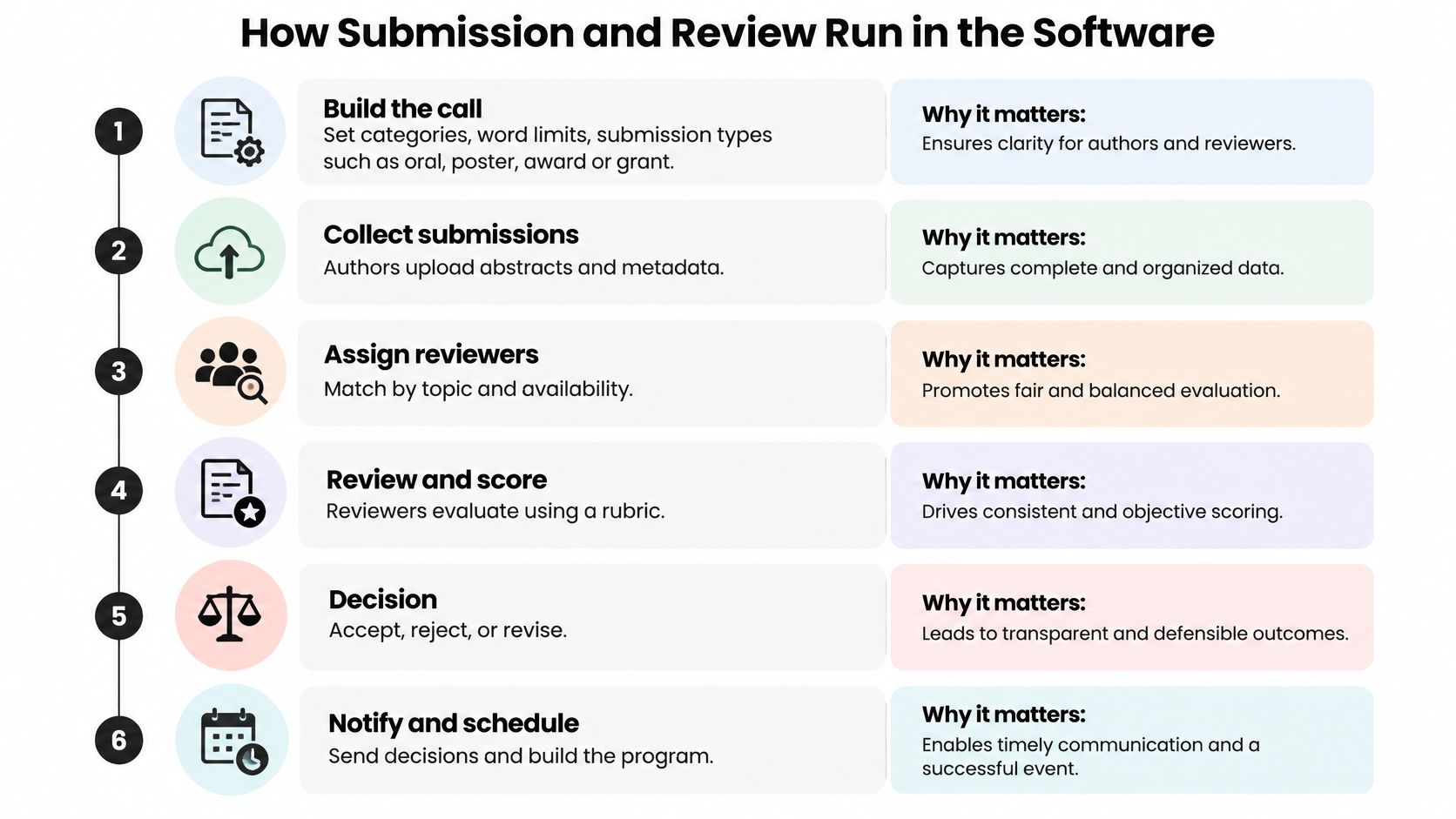
Build the call. Set categories, word limits, submission types such as oral, poster, award or grant, and required fields before anything opens. Every required field you add at this point saves an email exchange later, when there is no time for one.
Collect submissions. Authors enter structured fields, upload files and add co-authors, and the system keeps each version rather than overwriting the last one. An audit trail matters most in the week before decisions, when a change to authorship or a swapped file needs an explanation.
Run completeness checks before review. Flag missing affiliations, missing files or missing disclosures before an abstract reaches a reviewer, because a reviewer who can't open the file can't score it, and chasing that person costs a day or more.
Assign reviewers by topic and conflict. Set conflict-of-interest exclusions, cap how many abstracts each reviewer handles, and track who has responded and who is overdue. Untracked reviewers, not difficult ones, are what slow a committee down.
Score under stated review rules. Collect scores and comments in one place, and support multilevel review where a committee runs more than one stage. Reviewers need to see the same rubric and the same anonymization settings, round after round, which is where how peer review processes run matters more than scorecard design.
Decide and notify from the same record. Record accept, reject or revise status, then send author notices from the record that holds the decision history. When the letter comes from a different file than the status, the two disagree eventually.
The workflow advantage is consolidation. When submission, review and session building share one set of records, authors, reviewers and organizers work from the same submission, not from three copies with different dates.
Test the cycle on your own data
A working cycle has three properties you can check without a demo script. Every abstract has one current status. Every abstract has one current version. Every decision has a trail that someone outside the review team can follow.
Ask any vendor to run a sample cycle with ten of your real abstracts, including one revision and one reviewer conflict. What you want to see is what happens at the handoffs, not the dashboard.
Turning Accepted Abstracts Into Sessions
Accepting an abstract is a decision. Scheduling it is a different job with different stakes, and it's where a lot of clean review data gets destroyed by a spreadsheet.
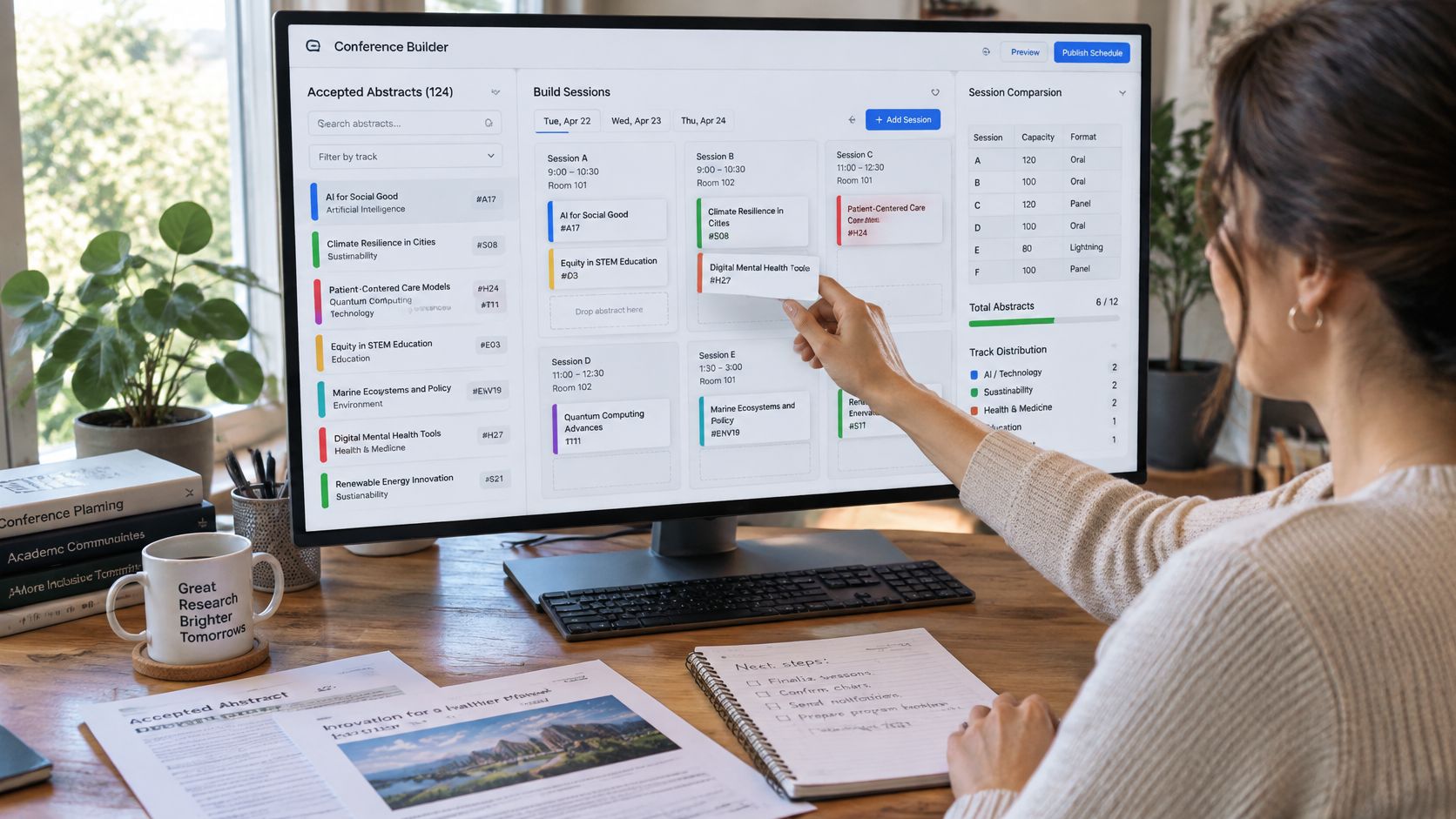
A session-building workspace lets organizers filter abstracts by topic, track or format, move submissions into sessions and check each session against its time limit. Planstone developed this kind of workspace with the American Physical Society, where APS sorters can filter abstracts, drag submissions into sessions and work within session-time limits, refined through a pilot meeting.
Then there's the speaker side. Where the software includes a speaker portal, it should show each person's assigned tasks, presentation files, disclosures and correspondence in one place. The speaker portal gives speakers a central place to manage assigned tasks, disclosures, presentation files and correspondence, which means staff can see outstanding items before the event rather than the morning of it.
Change management is the part that breaks programs. A presentation type moves from poster to oral, a session shifts to a different room, a co-author is added, or a revised file replaces an old one. Each change should update a single record. When it creates a new copy instead, the program, the speaker portal and the published proceedings start to disagree, and the disagreement usually surfaces as a typo in a printed program.
Presentation format also complicates the record later. A study of the 2003 Urological Brazilian Meeting, where 1,400 abstracts were presented across oral submissions, commented posters, uncommented posters and videos, found that only 39% were later published, after a median of 14 months (copy hosted on CiteSeerX). Different formats follow different paths, so the record has to carry format, status and identifiers forward.
Run this check before you publish a program:
- Confirm each session fits its time limit.
- Confirm every speaker's assigned tasks are complete.
- Confirm the presentation file attached to each abstract is the current version.
Ask for these three steps to be demonstrated on a sample session during evaluation, so the claim is tested rather than assumed.
Metadata and Disclosure Controls to Check
The abstract record has a life after the meeting, and a system that treats it as formatted text rather than structured data creates rework the moment you publish proceedings.
Crossref's required and recommended elements for conference proceedings requires contributor names, a title and a DOI for each conference paper, and recommends publication date, pages, citations, funding, license, relationship metadata and the abstract itself. It also recommends event-level fields such as conference name, acronym, date, location, theme and sponsor. The practical consequence is a data model: keep the event, proceedings, session, presentation and paper as separate entities so a change in presentation type doesn't corrupt everything downstream.
Structure matters as much as field coverage. Crossref's markup guide for conference proceedings permits abstracts imported from JATS XML and requires the JATS namespace for the abstract and its child elements, with MathML available through its own namespace. Convert an abstract with equations or subheadings to plain text before export and the notation is gone. Require a round-trip test from submission to deposit, and check the rendered preview against the deposited representation.
Disclosure is a pre-review control, not a form field
For accredited education, timing is the whole point. ACCME's rule on identifying and mitigating relevant financial relationships requires providers to collect financial-relationship information from all planners, faculty members and other individuals who control educational content, covering the prior 24 months. Providers must determine which relationships are relevant and mitigate them before the individual takes a content-control role.
Content compliance adds a second gate. Under ACCME's rule on ancillary activities, accredited materials including slides, abstracts, handouts, evaluation mechanisms and disclosure information must not contain corporate or product logos, trade names or product-group messages from an ineligible company. Building financial disclosure management into the abstract record, rather than running it as a separate spreadsheet after session assignments, keeps both gates auditable.
Three questions to ask any vendor:
- Can the system export a structured, schema-validated metadata record, or only generate a PDF?
- Can it hold a 24-month disclosure history per person, across events?
- Can it withhold a session from publication until its disclosures are resolved?
Where AI Fits and Where Human Review Must Stay
AI features are easy to demo and hard to govern, and most product pages skip the hard questions. The ones that matter are about decisions: which ones the software may make, how reviewers learn AI was used, and how errors and biased triage get audited.
| Task | Appropriate automation | Human ownership |
|---|---|---|
| Completeness checks | Yes, as flags for staff to review | Staff resolve missing fields and files |
| Duplicate-topic detection | Yes, as flags | Staff decide whether duplicates are real |
| Reviewer routing | Limited, as suggestions only | Staff confirm conflict exclusions and reviewer independence |
| Scoring | No | Reviewers score under the review rules |
| Acceptance or rejection | No | Committee decides and records the reason |
| Grammar, translation, transcription | Yes, limited support | Authors check meaning, and disclosure may not be required |
| AI-generated claims or conclusions | Not a substitute for checking | Author or reviewer checks manually before the abstract advances |
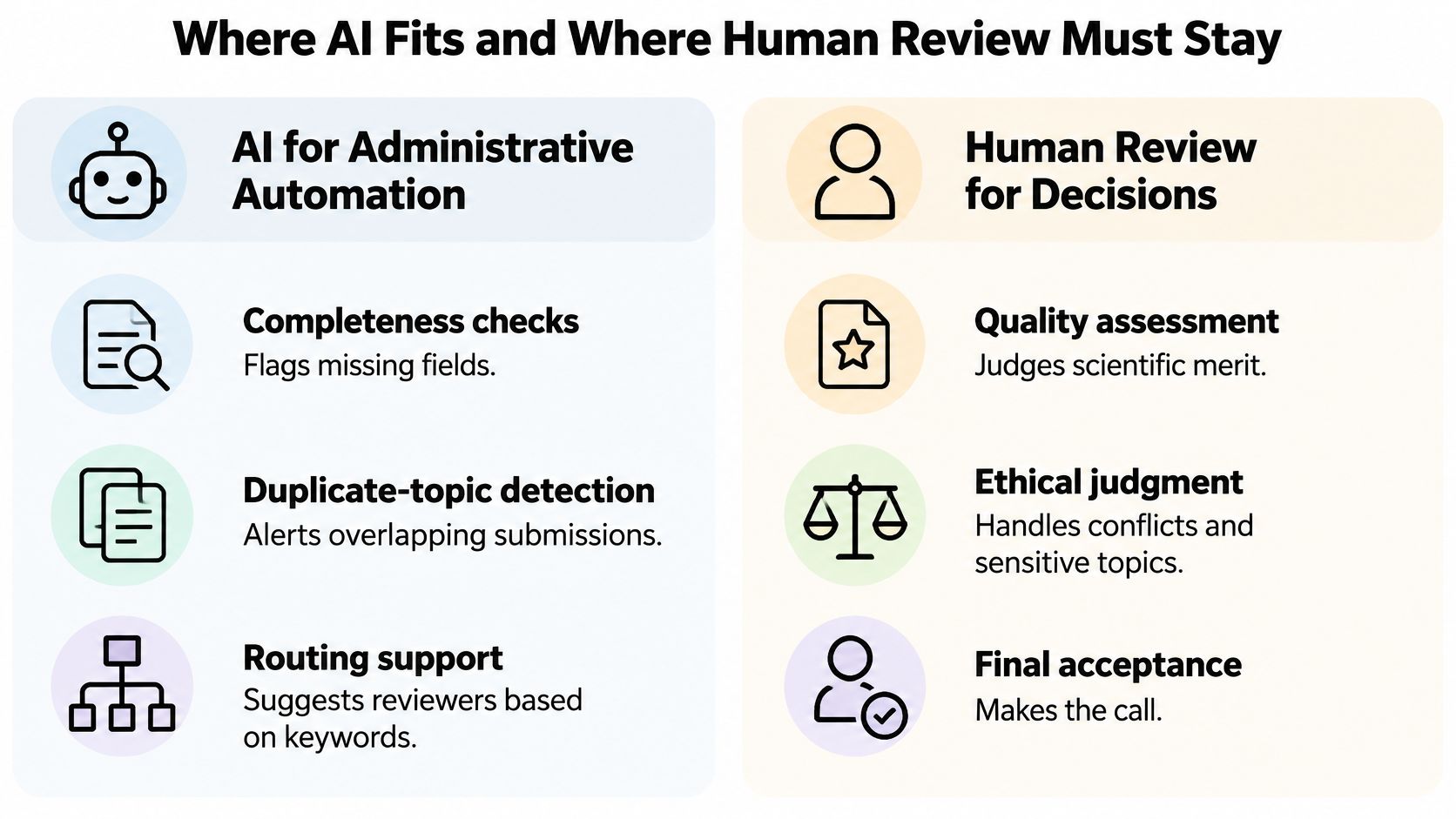
Recent guidance on conference abstracts draws the line clearly: AI-generated claims and conclusions must be manually checked, while limited-support uses such as grammar correction, translation, transcription and meeting-minute production may not require disclosure. That distinction is a workflow rule, not a marketing position, and it belongs in your reviewer instructions.
The governance test: ask for an audit log of every automated action, then confirm that reviewer independence survives AI-assisted routing.
Five questions separate a governed feature from a checkbox:
- Which decisions may the software automate, and which require a named human?
- How is a reviewer told that AI was used on a particular abstract?
- How are false positives and biased triage audited, and by whom?
- Where are conflicts of interest logged, and can they be exported?
- Can a human override any automated output, at every stage, with the override recorded?
AI should cut administrative load without becoming the decision-maker. A vendor's answer to "who decides" tells you more than its model list.
Confirm Your Requirements Before You Shortlist Vendors
Match your program profile to modules, review stages and integrations before you look at any product tour. The requirement list you write now becomes the document every quote is measured against.
| Program profile | Typical requirement | What to verify |
|---|---|---|
| Small meeting, under 30 abstracts | Basic submission and review with clean records | Structured export of records, not only a PDF |
| Large multi-track or accredited program | Disclosures, credit tracking, speaker portal and app integration | Integration with registration and credit records, plus 24-month disclosure history |
Accessibility belongs on that list across the whole lifecycle, not just the submission form. Reviewer interfaces need to work with screen readers, dual-anonymous review needs to keep accommodation data separate from what reviewers see, and presentation files, handouts and captioning metadata all need checks. A 2025 hybrid conference report describes more than 120 abstract submissions and notes that roughly three-fifths of participants had no way to promote their work, while also documenting failures in transmitting in-room questions to remote attendees. Accepting an abstract is not the same as giving its author visibility.
Cost is where buyers get stuck, and there are no reliable public price ranges for this category. Pricing typically depends on the number of abstracts and tracks, which modules you use, integrations with registration, audiovisual and event-app providers, configuration and staff training, and the level of account support. Accredited programs carry additional obligations that shape cost, and the money involved is substantial: ACCME's 2024 data report records $3.7 billion in total income reported by ACCME-accredited providers, including more than $725 million from advertising and exhibits.
Write an RFP for event management that puts every vendor against the same requirement list, then compare what each quote includes rather than the headline figure. Before you shortlist, Planstone's consultation starts with your program, existing systems and team requirements, and each account comes with dedicated conference management support.
One action this week: write a one-page requirement list covering volume, review stages, disclosures, accessibility and integrations, then request a demonstration using a sample of your real abstract data.
Frequently Asked Questions About Abstract Management Software
Is abstract management software the same as conference management software?
Not exactly. Abstract management covers the call, submission, review, decision and program stages. Broader conference platforms may also handle registration, housing and event operations. Check which scope a product covers, and ask where the abstract record stops being the system of reference.
What does it cost?
There are no reliable public price ranges for this category, so treat any figure you hear as a starting point rather than a benchmark. Request written quotes against your requirement list, then compare scope line by line: modules, integrations, configuration, training and support.
Does an accredited program need more?
Yes. Disclosure collection before anyone takes a content-control role, a 24-month disclosure history, and a content-compliance check before materials are released all become required controls. Confirm each one inside the demonstration, using a real abstract with a real disclosure attached.
Planstone builds abstract management, speaker management, disclosures, evaluations, credit tracking and handouts into one configurable platform for associations and education teams, so the record captured at intake is the same record that reaches the program and the credit certificate. If you want to see how that holds up against your own workflow, bring a sample of your abstracts and your review stages to a conversation with the team at Planstone.