

Only 37.3% of conference abstracts are subsequently published in full, according to a Cochrane review, and even a modeled follow-up period of ten years raised the estimated rate to just 46.4% (Cochrane review of abstract publication outcomes). An abstract submission form is the structured online form a conference or association uses to collect proposed presentations, including authors, affiliations, structured abstract text, topic classifications, presentation preferences, and disclosures, in a review-ready format.
That form is more than an intake page. It creates the record reviewers score, committees use to build a program, and staff rely on to coordinate presenters and preserve education records. A form designed around what happens after submission can make each of those steps more dependable.
Table of Contents
- What an Abstract Submission Form Does
- Field Categories Every Abstract Submission Form Needs
- Author and Affiliation Fields
- Structured Abstract Content Fields
- Topic and Presentation Type Fields
- Disclosure and Compliance Fields
- Prior Presentation and Duplicate Submission Fields
- Accessibility and Accommodation Fields
- Connecting the Form to Review and Credit Workflows
- Choosing Abstract Submission Software
- Quick Reference Field Checklist
What an Abstract Submission Form Does
A conference can't control whether presented research eventually reaches the scholarly literature, but it can control the quality of the information it collects. The Cochrane review found that more than half of initially presented abstract results still didn't become full publications, even when follow-up was modeled over ten years. That makes accurate, structured records valuable: they help associations make sound program decisions and retain information that can support later reporting and follow-up.
Think of the form as the first record in a program lifecycle. Reviewers use its study details and classifications to assess submissions and match expertise. Program staff use acceptance decisions, presentation preferences, and author details to assemble sessions and contact presenters. Education teams may later depend on the same records to connect presenters with disclosures, evaluations, and credit administration.
A single open text field makes those jobs harder. Staff may need to infer study type from prose, re-enter author information, or contact submitters to fill gaps. A structured form captures information once and makes it usable by different people for different tasks. That's why associations should treat it as a database schema, not a document upload.
For example, storing author identities separately from abstract text makes blinded review possible without losing the information needed to build the program. Capturing presentation type as a selection, rather than burying it in a paragraph, lets staff filter accepted work when planning sessions.
The submission workflow should also fit into the wider conference system. A useful starting point is to map how submissions move through review and into program operations, as outlined in Planstone's overview of conference submission workflows. The central design question is simple: what decision or task will each field support after the submitter clicks “submit”?
Field Categories Every Abstract Submission Form Needs
An efficient abstract submission form has five practical field categories. Use them as an audit map: if a category is missing or poorly structured, a downstream team will usually have to recover that information manually.
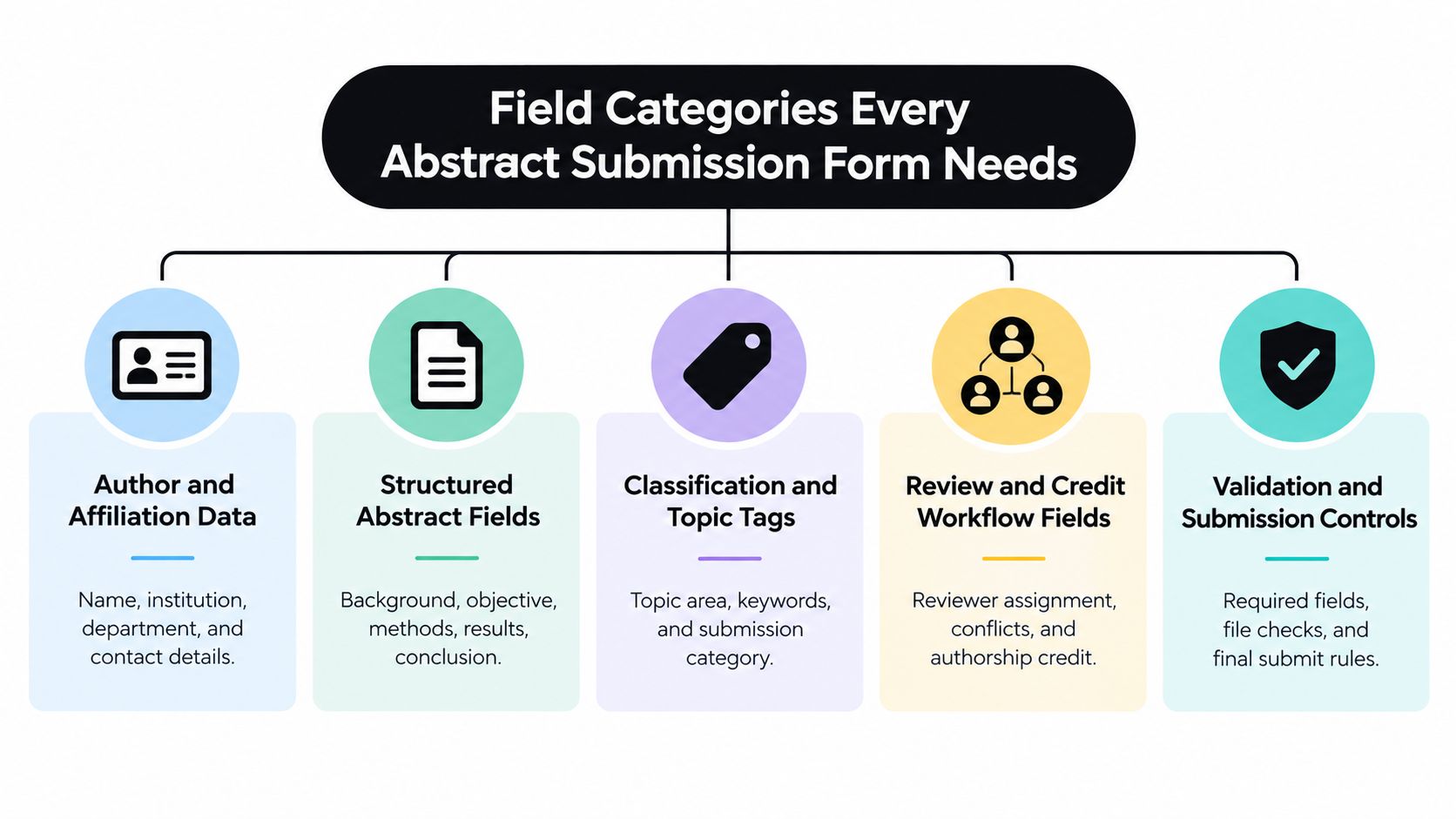
- Author and affiliation data identifies submitters, presenting authors, co-authors, institutions, and correspondence contacts. Review administrators use it to manage author records and, where necessary, separate identity from material sent for blinded scoring.
- Structured abstract fields organize the research narrative into sections reviewers can evaluate. Study details such as methods and findings should be captured in fields that fit the selected study type.
- Classification and topic tags help committees route work to reviewers and build sessions around subject areas and presentation formats.
- Review and credit workflow fields support reviewer assignment, conflict handling, decision tracking, and the later record of authorship or presentation credit.
- Validation and submission controls enforce instructions, required information, and applicable limits before a submission reaches the review queue.
Not every field belongs on the first screen. Grouping fields by task gives submitters a clearer path through the form, while conditional sections can keep irrelevant questions out of view. The goal isn't to collect every conceivable detail; it's to collect the information staff need, in a format they can use.
These principles overlap with good general form design, especially clear labels, logical grouping, and avoiding unnecessary friction. For a broader discussion of those fundamentals, see WebinOne's guide to contact form design. For conference teams, the extra test is whether the captured data remains useful after the form closes.
Author and Affiliation Fields
Author information should be recorded as structured data, not typed into the abstract narrative. Start with the submitter's name and email, then identify the corresponding author and the presenting author. They may be the same person, but the form shouldn't assume that they are.
Capture authorship in a reusable way
Provide a repeatable co-author entry area with a full name, institutional affiliation, and author order. If authors can have multiple affiliations, let them connect each person to the relevant institutions instead of asking them to squeeze everything into one free-text field. A separate department field can be useful when the association needs to distinguish teams within a large institution.
Ask submitters to confirm spelling, author order, and affiliation before finalizing. If co-authors must affirm their listing or complete their own information, make that step explicit and track its completion separately. This reduces the risk of staff discovering a missing affiliation or incorrect presenter after the program has been assembled.
Keep contact details distinct from information intended for the program or publication. An email address may be needed for correspondence without being appropriate for a public-facing program record. Clear field labels and permissions make that distinction easier to manage.
Design for blinding and submission limits
When peer review is blinded, store identity fields separately from the abstract text reviewers see. The review version can then exclude names and affiliations while authorized program staff retain access to the full record. Test the workflow from both perspectives: the reviewer's view should protect anonymity, and the administrative view should preserve the author information needed to contact accepted presenters.
Submission limits also need to be enforced at the person level if the conference sets them that way. Western University's guidelines, for example, allow each individual to submit up to two abstracts and describe a blinded peer-review process (Western University's abstract submission guidelines). A form that limits entries only by account may not catch repeat submissions by the same individual using a different account. Decide which rule applies, then configure the field and validation around it.
Structured Abstract Content Fields
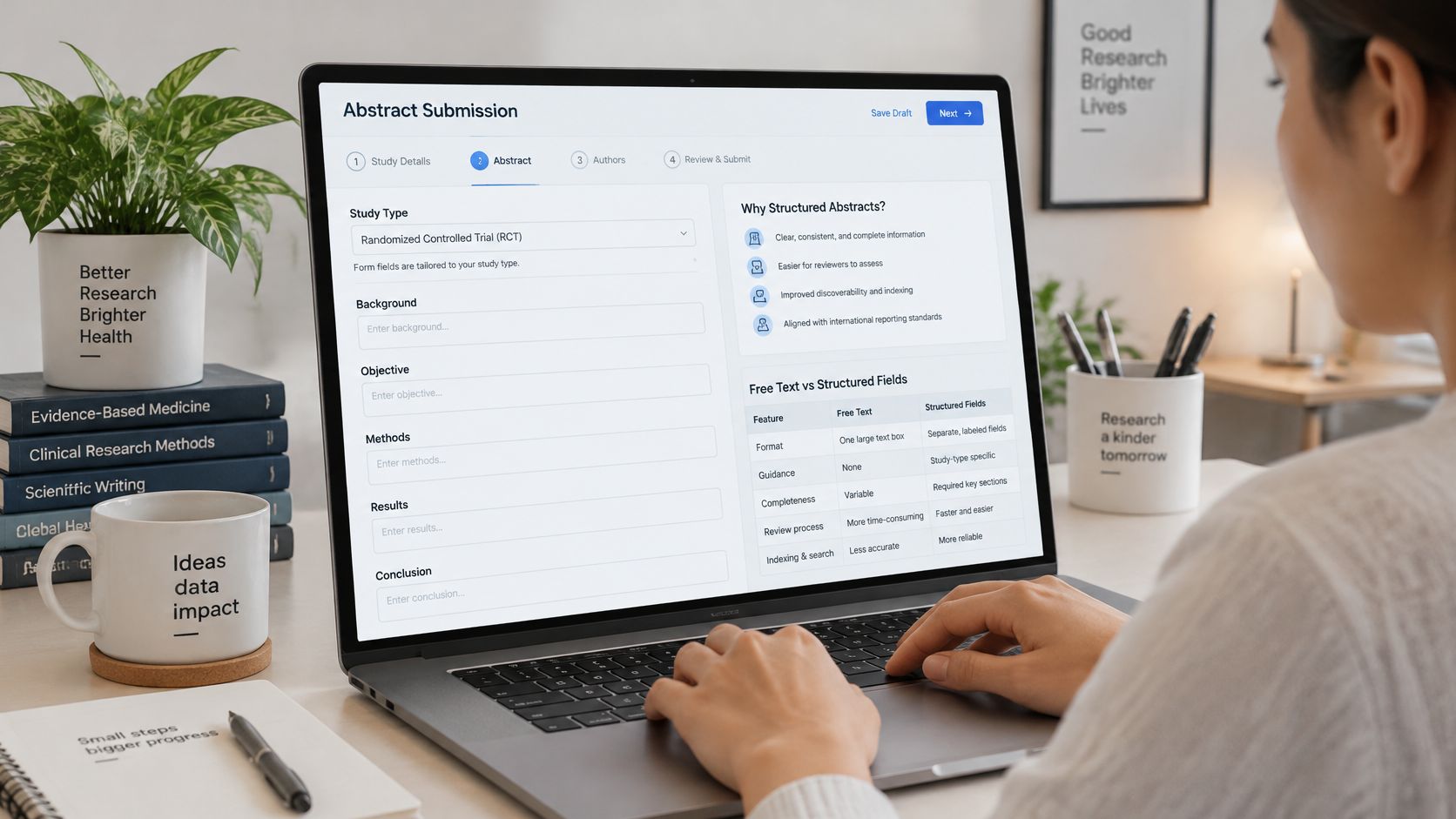
A single unrestricted text box is convenient to configure, but it leaves reviewers to hunt for key information and makes submissions harder to compare. For medical and scientific work, use a study-type-aware schema that captures the research question and the information needed to judge how the work was conducted.
Build the core structure first
A practical core schema can include:
- Background or context: What problem or gap motivates the work?
- Objective: What question does the study address?
- Participants or data selection: Who or what was included, and how were they selected?
- Setting and measurements: Where did the work take place, and what was measured?
- Methods and analysis: How were data collected and analyzed?
- Principal findings: What did the study find? Where applicable, request effect sizes and distinguish statistical from clinical significance.
- Conclusion and limitations: What do the results mean, and what limitations should reviewers consider?
The International Committee of Medical Journal Editors says structured abstracts should report purpose, procedures, findings, and conclusions (ICMJE guidance on preparing a manuscript for submission). Use that as a general foundation, then adapt the form to the research being submitted.
Capture funding in its own field rather than inside the narrative. For clinical trials, request a trial registration number. For secondary analyses, collect the persistent dataset identifier, repository name, and identifier so those details can be retained and checked independently of the abstract text.
Make the fields responsive to study type
Conditional logic lets the form ask relevant follow-up questions without presenting every submitter with every possible field. Randomized trials can receive CONSORT-oriented prompts, systematic reviews PRISMA-oriented prompts, diagnostic studies STARD prompts, and observational studies STROBE prompts. The EQUATOR Network catalogs reporting guidelines, including resources relevant to conference abstracts (EQUATOR Network reporting guidelines).
Require only fields that apply to the selected study type, but keep a normalized internal model so reviewers can compare and filter submissions consistently. Set word or character limits at both section and total-abstract level, validate required metadata before final submission, and retain an audit trail of revisions. The International Committee of Medical Journal Editors recommends structured abstracts that report purpose, procedures, findings, and conclusions, as noted above; the form should turn that structure into clear prompts rather than leave authors guessing.
See how an abstract workflow can be represented in a submission interface:
Topic and Presentation Type Fields
Classification fields turn an inbox of submissions into information a scientific committee can route, compare, and use to build sessions. Keep the options aligned with the program the conference can deliver. Asking authors to choose a presentation format the event doesn't offer creates avoidable follow-up.
Start with topic tracks or subject categories. Use labels that reflect the committee's real review structure, then allow submitters to select keywords that add detail without replacing the main category. If multiple tracks can review the same topic, say whether submitters should choose a primary track, additional relevant topics, or both. Include an “other” option only when someone is responsible for reviewing those entries and deciding whether the list needs revision.
Presentation preference is a separate question. Offer only formats the event can schedule, such as poster, oral presentation, or workshop, and clarify whether the selection is a preference or a guarantee. A preference helps with planning; it shouldn't imply acceptance in that format unless the committee's policy says so.
Ask what stage the work has reached
A results-status or study-stage field tells reviewers whether they're assessing completed work, preliminary findings, a proposal, or work in progress. That distinction matters because committees may apply different criteria to completed research and proposed work.
A Cochrane analysis of 8,297 abstracts accepted at 25 Colloquia held from 1994 through 2020 found that 8.7% were promissory abstracts, meaning they were accepted without presenting completed results (Cochrane analysis of promissory abstracts). The finding makes a results-status question useful for distinguishing a completed study from a proposal, not a reason to exclude either category automatically.
Keep the choice clear and mutually exclusive where possible. Options might distinguish final results from preliminary or pending results, with a separate category for proposals if the event accepts them. Stable categories also help organizers compare records year over year, even when the precise program tracks change.
Disclosure and Compliance Fields
Disclosure collection is a compliance workflow, not just a text box asking whether an author has a conflict. For accredited educational activities, the Society of Medical Administrators says disclosure information must be completed by planners, faculty, and others who can control the educational content. Track disclosure status per individual, so staff can see who has completed the requirement and who still needs follow-up.
Ask about the process explicitly. Some conferences allow one author to submit disclosures for co-authors; others require each person to complete their own. The American College of Surgeons advises authors to check conference-specific requirements, including whether one author can submit disclosures for everyone or each author must submit separately. Its guidance also notes that abstract word limits vary by conference, while describing 250–500 words as typical (American College of Surgeons medical student abstract guide). The practical rule is to make the event's own requirements visible in the form rather than assume authors know them.
Separate the declaration from the abstract
Capture disclosures in fields tied to each person, not as a submission-wide yes-or-no answer. Depending on the workflow, the form may collect disclosures directly or create tasks for authors to complete in a connected speaker or faculty portal. Either way, staff need to see which people have responded and what remains outstanding.
Add ethics and compliance prompts that fit the activity. The Society of Medical Administrators requires relevant disclosure completion and states that work involving human or animal subjects must comply with the Declaration of Helsinki; its guidance also sets a 350-word abstract limit (Society of Medical Administrators abstract guidelines). Use fields for applicable ethics or compliance statements, and route answers that require review to the right staff member.
A disclosure process should make completion status easy to monitor before the event. Teams planning a connected education workflow can review Planstone's disclosure management information when considering how disclosure tasks relate to speaker preparation.
Prior Presentation and Duplicate Submission Fields
A blanket “no previously submitted work” rule can block legitimate dissemination without telling authors what the conference considers duplicate. Authors need a decision framework, not a vague warning. A regional meeting followed by a broader international conference may serve a different audience, while near-identical submissions to overlapping events can undermine novelty.
A modified-Delphi study found consensus on 39 of 44 proposed practices and concluded that guidance should give clear, consistent instructions about an abstract's life cycle. Panelists generally supported resubmission to a larger or different audience, but not to a more homogeneous audience (study on guidance for abstract submission and reuse).
Ask submitters to declare whether the work has been submitted, accepted, presented, or published elsewhere. If yes, collect the prior venue and date, and ask whether the current submission includes materially new analysis. Keep those answers structured, with an optional explanation field for context.
A clear policy should explain what happens to preliminary data, accepted manuscripts, preprints, registered reports, and late-breaking results. Avoid asking authors to interpret “duplicate” on their own. State what overlap is allowed, what must be disclosed, and who evaluates the declaration. That approach lets committees distinguish audience-sensitive reuse from repeated submissions that add little new work.
Practical rule: Ask authors to disclose prior presentation and explain the overlap. Let the stated policy and committee review determine whether the new submission is appropriate.
Accessibility and Accommodation Fields
Accessibility requests shouldn't wait until an abstract is accepted. If staff only learn about access needs after sessions are built, they may have to make late program changes, and an accepted presenter may find participation difficult or impossible.
Provide an optional, confidential accommodation field for submitters or presenters. It can ask whether the person needs an accessible presentation format, captioning, sign-language interpretation, remote participation, or a scheduling adjustment. Don't require people to provide a diagnosis to request a practical arrangement.
Explain who can view the response, when requests should be submitted, and how staff will follow up. State clearly that accommodation information is separate from academic scoring. A reviewer evaluating the research doesn't need access to sensitive logistics.
Global conferences also shouldn't assume access needs are limited to disability. Language, time-zone, caregiving, religious, and visa-related constraints may affect whether a presenter can participate. A well-designed form can invite those requests without promising that every preference can be met.
Independent accessibility guidance recommends identifying a specific accessibility contact, publishing transportation and hotel accessibility information before abstract submission, allowing accessible-room requests during registration, and applying presentation standards for font size and color contrast. Those details belong in event information and follow-up as well as the form itself. Collecting requests early gives staff a chance to plan, explain options, and identify logistical constraints before the program is finalized.
Connecting the Form to Review and Credit Workflows
The submit button should start a workflow, not end one. Author and classification data feeds reviewer assignment; review decisions determine which submissions become sessions; presenter information drives follow-up; and participant records can later support evaluation and continuing education documentation.
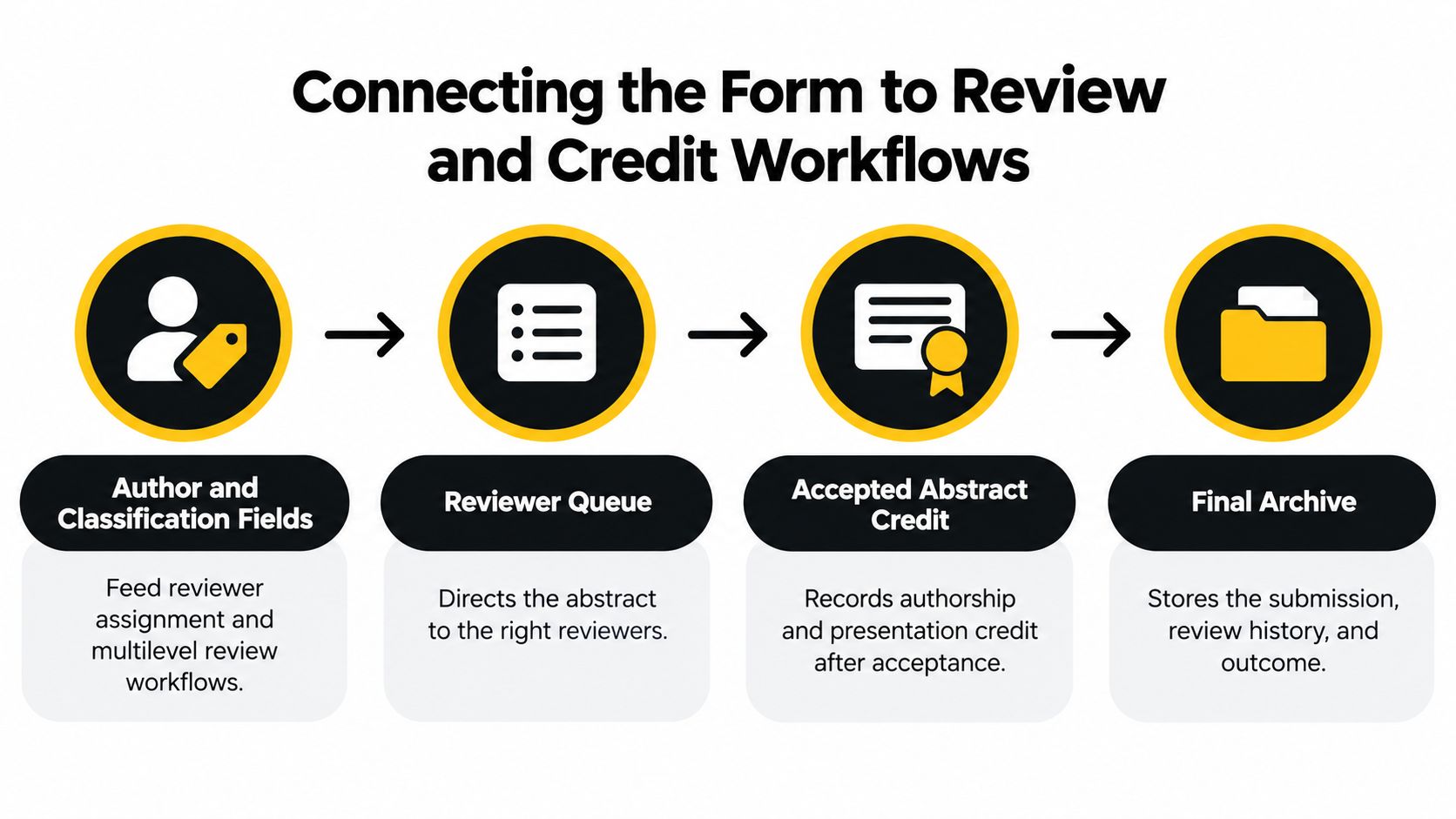
The author and affiliation details described above help staff identify and contact presenters, while the topic and presentation-type selections give committees practical ways to sort work. Once a submission enters the reviewer queue, conflict information and review assignments should remain connected to the same record, so staff can track the decision without re-entering the abstract.
Accepted work then moves into session building. Organizers need to filter abstracts, assign them to sessions, and account for the event's scheduling constraints. Presenter identity also needs to carry forward to speaker preparation, where staff can track disclosures, presentation files, correspondence, and outstanding tasks.
Keep the record intact: When a submission moves from review to a session, preserve its history and associated author information rather than creating a disconnected copy.
After the event, participant records and activity details support evaluations, credit calculations, and completion documentation. The Medical Board of California requires physicians to complete at least 50 approved CME hours during each two-year renewal cycle and retain supporting documentation for at least four years. Records must identify the physician, course or program title, attendance dates, credit hours, and sponsoring or accrediting organization (Medical Board of California CME requirements). Those requirements show why a conference record shouldn't stop at acceptance or attendance.
Teams evaluating how credit records connect to other education tasks can review Planstone's continuing education credit management information. Standardized records are especially useful when workflows span recurring events, changing program rules, and multiple staff teams.
Choosing Abstract Submission Software
The right system depends on the complexity of the program. A generic form or survey tool may work well for a small, single-track meeting with a simple review process. A dedicated abstract management platform becomes more relevant when the association needs conditional study-type fields, blinded review, co-author collaboration, per-person disclosures, or a path from accepted work to scheduled sessions.
| Capability | Generic Form or Survey Tool | Dedicated Abstract Management Platform |
|---|---|---|
| Conditional study-type fields | May support basic branching, depending on the tool | Can support configured submission workflows |
| Blinded review | Often requires separate handling of identity and review copies | Designed to support review workflows and identity separation |
| Per-author disclosure tracking | May need manual tracking or another system | Can connect disclosure requirements to individual authors |
| Co-author collaboration | May require separate forms or staff follow-up | Can support author collaboration within the submission workflow |
| Accepted abstracts into sessions | Usually requires exporting and re-entering data | Can connect accepted work with session-building workflows |
When comparing options, test the complete path using a sample submission. Can staff mask identities for review, see missing disclosures, and move accepted abstracts into sessions without copying the record into another tool? If you're comparing general-purpose survey products, Formbricks' guide to Alchemer competitors offers a useful perspective on evaluating form and survey alternatives.
Planstone is one dedicated option for organizations that want configurable submission workflows for abstracts, proposals, awards, and grants; author collaboration; multilevel review; and a session-building workspace developed with the American Physical Society to filter abstracts and work within session-time limits. Its connected speaker, disclosure, evaluation, and credit modules can support the movement of submission data through conference and education workflows. Organizations can also use individual modules alongside existing systems, depending on their needs.
A simpler tool may be the better fit when the meeting has few categories, one review stage, and no need to develop accepted submissions into complex sessions. Compare not just the cost of collecting responses, but the staff work required to validate them, route reviews, contact authors, and transfer accepted records.
Quick Reference Field Checklist
Use this checklist to audit an existing form before the next call for abstracts or to write requirements for a new system. Each item points to the section above that explains why the field matters.
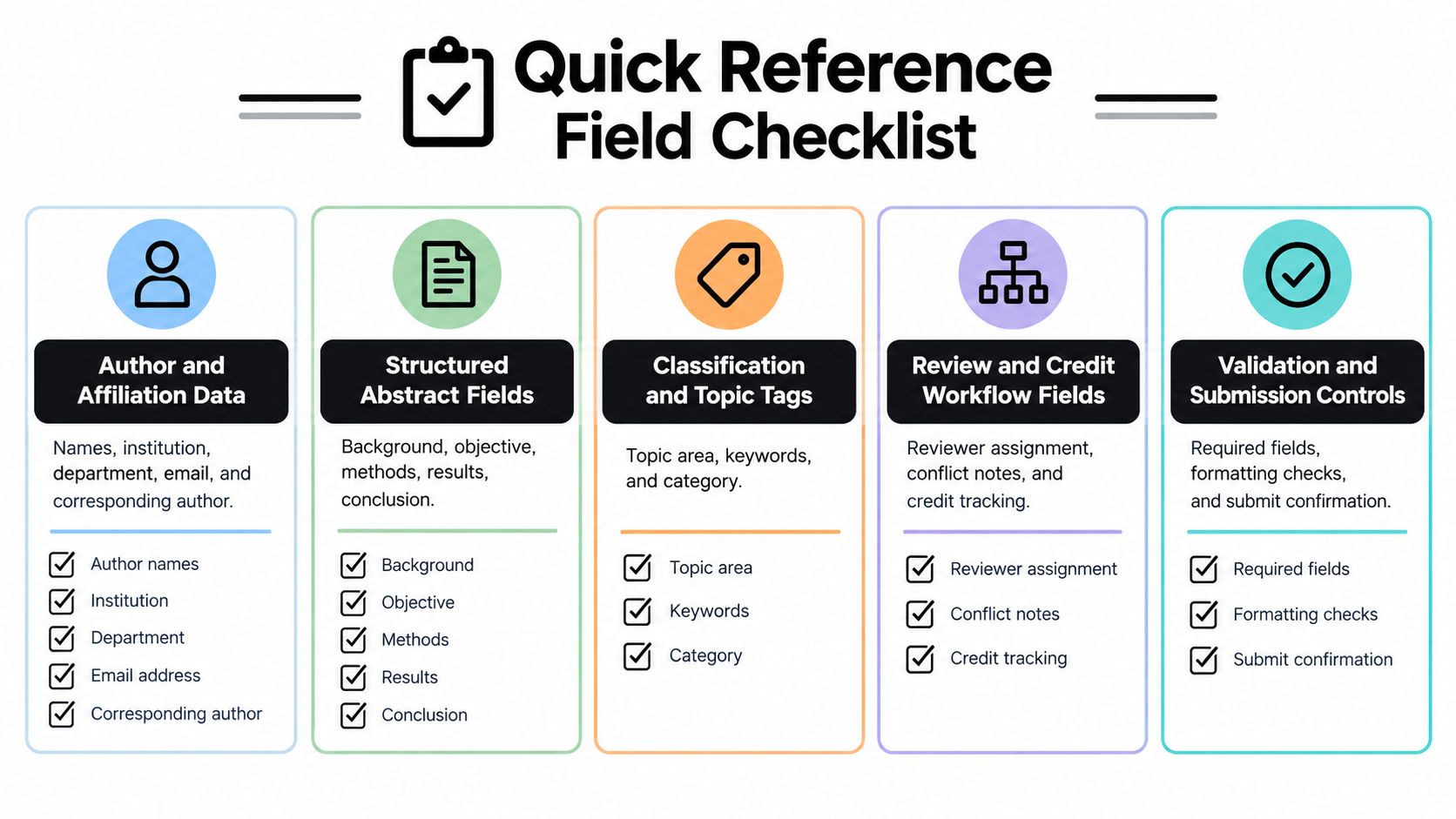
Author and affiliation data
- Submitter and contact: Name, email, corresponding-author designation, and communication preference. See “Author and Affiliation Fields.”
- Presenting author and co-authors: Identify the presenter, record author order, and capture each affiliation.
- Submission limits: Set the applicable limit and decide whether it applies per person, account, or another identifier.
Structured abstract fields
- Research narrative: Background, objective, participants or data selection, setting, measurements, methods, findings, conclusions, and limitations. See “Structured Abstract Content Fields.”
- Study-specific information: Funding, trial registration details, or dataset and repository identifiers, as applicable.
- Validation: Word or character limits, required fields, and revision history.
Classification and topic tags
- Topic routing: Tracks, subject category, and keywords. See “Topic and Presentation Type Fields.”
- Presentation selection: Available formats and whether a preference is guaranteed.
- Results status: Final, preliminary, pending, or proposal, as appropriate.
Review and credit workflow fields
- Review controls: Blinding, reviewer assignment, conflict notes, and decision status. See “Connecting the Form to Review and Credit Workflows.”
- Disclosures and compliance: Per-person completion status and relevant ethics statements. See “Disclosure and Compliance Fields.”
- Credit records: Participant identity, activity details, attendance, and credit documentation.
Validation and submission controls
- Prior-work declaration: Previous submission, acceptance, presentation, or publication, with venue, date, and overlap details. See “Prior Presentation and Duplicate Submission Fields.”
- Accessibility requests: Confidential accommodation fields, access permissions, deadline, and contact. See “Accessibility and Accommodation Fields.”
- Final confirmation: Review the submission, validate required information, and confirm receipt.
Before your next submission cycle opens, inventory the current form against this checklist and flag every category with missing or unstructured fields. That gives your program, review, and education teams a concrete requirements list to use when improving the workflow.
Planstone provides configurable conference and continuing education management software that connects abstract submissions with speaker preparation, disclosures, evaluations, and credit administration. If your current process relies on disconnected forms and manual transfers, visit Planstone to explore how its submission and education workflows could fit your association's requirements.